
The best way to standardize packaging across a product line isn’t to make every package identical. Modular packaging design for multiple products works when shared components simplify purchasing and inventory without creating a poor fit or inadequate protection. A common box format may suit several items, while product-specific foam inserts or cushioning address differences in shape, fragility, and shipping needs.
If separate packaging specifications are complicating orders and warehouse storage, a modular system can create a more manageable middle ground. This guide explains how to identify components products can share, where custom protection still matters, and how to plan packaging for repeat supply. It also covers how packaging reviews, CAD/CAM design support, prototypes, and samples can help assess a system before it becomes part of daily operations. The goal is to reduce unnecessary packaging variation while preserving the fit each product needs, then make purchasing, kitting, and replenishment easier to manage.
Key Takeaways
- Group products by shared handling, shipping, and protection needs before deciding which packaging components can be standardized.
- Use modular packaging design for multiple products to simplify purchasing while retaining product-specific fit and cushioning where needed.
- Compare modular and separate custom packages across protection, flexibility, inventory, and operational complexity rather than assuming one approach suits every SKU.
- Pilot representative products and assess fit, packing workflow, storage, and shipment handling before extending shared specifications across a product line.
- Combine corrugated boxes, foam, crates, and kitting into a packaging system designed to support repeat supply and warehouse operations.
What Modular Packaging Design for Multiple Products Means in Industrial Operations
Separate packaging specifications can create extra work for purchasing and warehouse teams, but putting every product in the same box can leave poor fit or protection gaps. Modular packaging design for multiple products uses shared packaging components and design rules across a related product family, while tailoring the details each item needs. A common outer box or packing method might work for several SKUs, while inserts, cushioning, or dimensions vary by product.
This approach applies the principles of modular design to packaging: standardize the parts that can be shared and adapt the parts that need to differ. For industrial operations, modularity is both a packaging engineering and a purchasing decision, not simply a choice of box format.
How modular packaging differs from one-size-fits-all packaging
A one-size-fits-all package treats product differences as inconveniences. A modular system accounts for them. It may use a shared box style or packing sequence while allowing product-specific dimensions, foam inserts, or cushioning materials. The goal is not to make every package identical, but to establish a controlled set of common elements and approved variations.
For example, a manufacturer might ship a family of related control units in several sizes. The units could share a box design approach but use different internal supports or cushioning to suit each configuration. Clear design rules help purchasing identify common components and help packers select the right configuration without relying on informal workarounds.
That structure can also make specifications easier to maintain. Instead of treating each SKU as an entirely separate packaging project, teams can document what is common, what varies, and which products each configuration serves. Custom packaging design supported by CAD/CAM, prototypes, and samples can help teams assess these choices before standardizing them.
Which industrial product lines may benefit from a modular approach?
Modularity may be worth evaluating when related products share shipping methods, handling steps, or protection needs but differ in dimensions or other packaging requirements. Electronics, industrial equipment, and medical device packaging are examples of contexts where product families may include multiple configurations. Shared handling does not automatically mean shared packaging. The right approach depends on each product’s characteristics and shipping requirements.
- Electronics: Related units may share a packaging structure while requiring different internal layouts or protective details.
- Industrial equipment: Components shipped through similar workflows may use common packaging elements, with variations for size or handling.
- Medical devices: Related products may share selected packaging components, while individual product and shipping requirements guide the design.
Before grouping SKUs, compare how each product is handled, positioned, packed, stored, and shipped. When those needs align, a modular system can help organize packaging supplies and purchasing. When they don’t, forcing a shared format can add complexity instead of solving it.
How to Build a Modular Packaging Architecture Around Shared Components
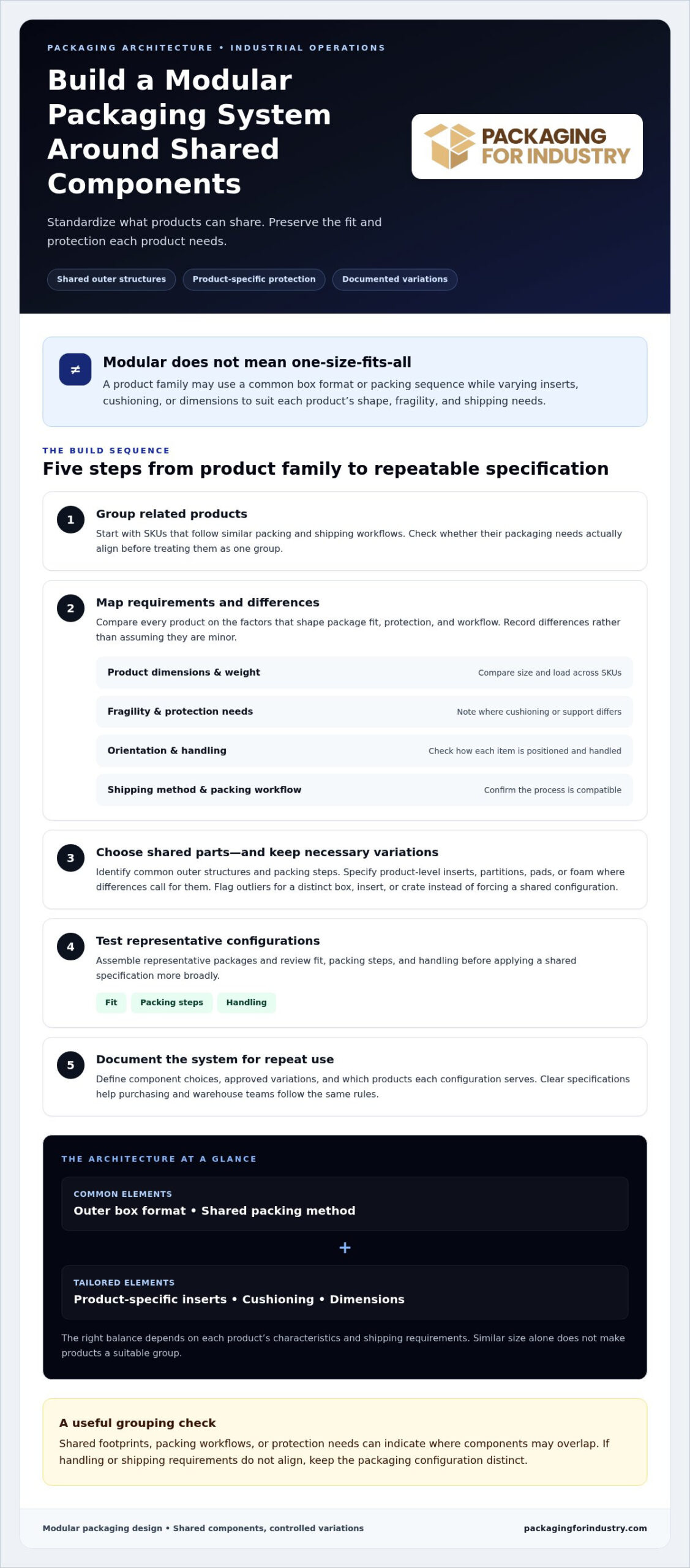
Build the system from product requirements, not from an existing box size. A practical modular packaging design for multiple products process moves from grouping and comparison to component selection, testing, and documentation. This sequence helps teams decide which parts can be standardized and which must remain specific to a product.
- Group related products. Start with SKUs that follow similar packing and shipping workflows, then check whether their packaging needs truly align.
- Map requirements. Compare dimensions, weight, fragility, orientation, handling, and shipping method. Record differences instead of assuming they are minor.
- Select shared parts. Identify possible common outer structures and packing steps, then list inserts, partitions, pads, or foam that may need product-specific configurations.
- Test the configurations. Assemble representative packages and review fit, packing steps, and handling before applying a shared specification more broadly.
- Document the system. Define component choices, approved variations, and the products each configuration serves so purchasing and warehouse teams can follow the same rules.
Map product families and packaging requirements
A product-family matrix makes the comparison visible. Use a row for each SKU and columns for dimensions, weight, fragility, shipping method, orientation, and handling process. Add notes about shared footprints or protection requirements. Similar size alone doesn’t make products a suitable group if they ship differently or need distinct handling.
- Group products when their footprints, packing workflows, or protection needs align.
- Flag outliers that may need a distinct box, insert, or crate rather than forcing them into a common configuration.
Choose shared structures and product-specific protective elements
Once the matrix shows where requirements overlap, assess whether a shared corrugated structure can accommodate the product family. Custom corrugated boxes can provide a common outer format, while internal layouts vary by SKU. The design rule is straightforward: share components only where requirements align, and customize protection wherever product fit or handling needs differ.
Depending on the product, internal variations may include foam inserts for distinct positioning, partitions to separate components, or pads to support a different arrangement. Select these elements around the product’s actual fit and shipping requirements, not as interchangeable parts by default. A shared outer package is useful only if each approved configuration works in the packing process.
Keep the specification practical for the people who order and use it. Give each approved configuration a clear identifier and record its compatible products, shared components, and SKU-specific elements. If you’re developing a system across related products, you can request a packaging design quote to define the requirements for review.
Modular Packaging vs. Separate Custom Packages: How to Compare the Options
Standardization should make packaging easier to manage, not take priority over product fit. Compare modular designs and separate custom packages against the actual demands of each product family. A shared structure may simplify ordering and storage when products have compatible outer dimensions or handling needs. A separate package may be more practical when an item’s size, fragility, or shipping conditions call for a distinct design.
Use these criteria to identify trade-offs. The comparison below is a starting point, not a universal recommendation. Product testing and shipping conditions should inform the final choice.
| Decision criterion | Modular design | Separate custom packages |
|---|---|---|
| Protection | Can suit products with compatible requirements and product-specific inserts. | Allows each package to address distinct fit or protection needs. |
| Flexibility | Supports variations through shared structures and interchangeable internal components. | Provides a dedicated design for each product but maintains separate specifications. |
| Inventory | May reduce the number of distinct components to purchase and store when products share parts. | Requires teams to manage product-specific packaging items and replenishment. |
| Operational complexity | Requires clear configuration rules so packers select the correct insert or arrangement. | Requires staff to follow separate packaging specifications for each product. |
When shared packaging components are a practical fit
A modular approach can work well for related products that use a similar outer footprint, travel through the same packing process, or have compatible shipping requirements. For example, a product family with several configurations might use one outer box design while interchangeable inserts position each version. The shared structure supports consistency; the insert accommodates the product’s particular shape and orientation.
That compatibility still needs to be demonstrated. Test representative products in their intended configurations and consider the relevant shipment handling conditions. If a shared package creates excess movement, complicates packing, or fails to accommodate the product’s requirements, revise the design or separate that SKU from the group.
When separate packaging designs may be the better choice
Keep an outlier distinct when it differs substantially in size, fragility, orientation, or shipping method. A heavy or sensitive component, for instance, may need a dedicated foam-lined crate rather than an adapted version of a shared corrugated package. A custom wood crate can be assessed against the component’s handling and transit needs.
With modular packaging design for multiple products, the decision is not “standardize everything” or “customize every SKU.” Keep components common where requirements genuinely align, and preserve separate designs where they don’t. This balanced approach helps teams manage packaging inventory without compromising fit, cushioning, or shipment suitability.
How to Pilot, Validate, and Roll Out Modular Packaging Across SKUs
A modular design should work in daily operations before it becomes the standard for an entire product line. Pilot representative products first, including typical items and SKUs with tighter fit, handling, or protection requirements. This lets the team find configuration problems on a manageable scale and refine the design before shared specifications reach purchasing and the warehouse.
Prototype and evaluate representative products
Use prototypes or samples to evaluate real products in the proposed packaging. Include a typical SKU and a challenging one, such as a product with an unusual shape or a different packing orientation. Assess whether the product fits as intended, whether the package can be assembled consistently, and whether product-specific cushioning or inserts stay correctly positioned.
Observe the complete packing workflow, not just the finished package. Have packers follow the proposed instructions and note where components are unclear, difficult to place, or easy to confuse. Consider how the package will be stored and handled, along with relevant shipment conditions. Testing should determine whether the design meets project requirements, rather than rely on assumptions about protection.
- Fit: Check that the product sits in the intended position and that the package closes correctly.
- Assembly: Review the steps, component order, and clarity of instructions.
- Protection and handling: Inspect the package after representative handling and shipment evaluation appropriate to the product.
- Operations: Note effects on packing flow, component storage, and material selection.
Record observations by product and configuration. If a prototype does not meet the defined requirements, revise the structure or insert and evaluate it again. A product that needs a different configuration can remain an approved exception instead of weakening the shared design for the rest of the group.
Prepare specifications for repeat purchasing and packing
Once the pilot supports a design, document the approved system in terms purchasing and warehouse teams can use. Identify shared materials, product-specific inserts, compatible SKUs, and approved variations. Include clear assembly instructions and a way to distinguish configurations so the correct components are ordered, stored, and packed together.
Connect the packaging specification to replenishment as well as pack-out. Confirm which components need to be available together, how they’ll be stored, and how purchasing will recognize each approved version. If coordinating separate materials at the packing station creates extra handling, packaging kitting can prepare components together for use. For recurring demand, consistent specifications also provide a basis for inventory planning.
Roll out the validated design in stages, then capture feedback from the people using it. Review changes in product configurations, packing steps, and shipping requirements before revising shared specifications. This keeps modular packaging design for multiple products useful as the product line and daily workflow change.
How PFI Supports Modular Packaging Design for Multiple Products
For packaging for manufacturers, the design needs to support both product protection and purchasing decisions. PFI combines custom packaging design support with corrugated boxes, foam, crates, and related materials to develop solutions around product and workflow requirements. CAD/CAM support, prototypes, samples, and packaging reviews help teams assess design options and prepare specifications for purchasing and operations.
Combine packaging materials around the product and shipping method
A packaging quote can consider the box structure together with internal components, rather than pricing each material in isolation. PFI’s foam packaging solutions can be paired with corrugated packaging when products need distinct internal configurations. Comparing packaging pricing across the complete design helps buyers evaluate options and identify opportunities to lower packaging costs without overlooking fit or shipping requirements.
For warehouse and distribution workflows, the review can also account for how materials are stored, selected, and assembled. This keeps the proposed system relevant to the people who pack and handle products.
Plan for recurring supply as product needs change
For repeat orders, documented specifications help purchasing teams distinguish shared components from product-specific variations. PFI’s vendor managed inventory and just-in-time packaging programs support recurring supply planning, while packaging kitting can coordinate materials for use at the packing station. Buyers evaluating bulk packaging pricing can include expected usage and configuration needs in their purchasing review.
PFI provides local next-day delivery throughout Southern California, including Orange County, Los Angeles, San Diego, and Riverside, along with nationwide shipping. For a product-line review that considers design and supply needs, request a packaging quote.
Make Your Next Packaging Decision More Deliberate
Use your next packaging review to focus on where the current system creates friction. Which product families require separate orders, take up disproportionate storage space, or create extra steps at the packing station? Those patterns can help your team decide where modular packaging design for multiple products is worth evaluating, and where a dedicated solution remains the better operational choice.
Bring together the people who specify packaging, purchase it, and use it. Their perspectives can clarify which changes would make replenishment more manageable and which package details are essential in day-to-day shipping. A focused product-line review gives the design work a clear purpose: improve coordination without losing sight of how each product moves through your operation.
Start with a product-line packaging review and request a quote from PFI to plan a system your team can manage with confidence.
Frequently Asked Questions
Can modular packaging accommodate products with different dimensions?
Yes, if the system defines clear limits for each package configuration. Compare the full packaged dimensions, including protective materials, and record which SKUs fit each configuration. Keep that information tied to current product drawings or measurements. If a product changes, update its packaging record before the change reaches purchasing or the packing station, so teams don’t rely on outdated fit assumptions.
Is modular packaging suitable for fragile or high-value industrial products?
It can be, provided the design review starts with the product’s risk points rather than a standard format. Document sensitive surfaces, components that must remain fixed, and handling concerns identified by quality or shipping teams. Agree on what an acceptable package condition looks like before evaluating a configuration. This gives reviewers a consistent basis for assessing whether the design addresses the product’s specific requirements.
What information should a manufacturer prepare for a modular packaging quote?
Along with product details, gather current package drawings or photos, a sample of existing packaging if available, and the number of configurations used across the line. Note how frequently each version is packed and where the package ships. Include recurring issues such as assembly confusion, damaged corners, or materials that are difficult to store. These details help frame a quote around both the package and its operational use.
Can one corrugated box design work with different foam inserts?
Yes, but configuration control matters at the packing station. Label each insert and its compatible SKU clearly, and store variants so packers can distinguish them without relying on memory. Include the insert identifier in the work instruction or packing record. This helps prevent a correct outer box from being paired with the wrong internal component, especially when similar products are packed in the same area.
How does modular packaging affect packaging inventory?
It changes how inventory should be identified and monitored. Track common materials separately from product-specific components, and review usage by configuration rather than treating the family as one item. That view can help purchasing recognize slow-moving variants, changes in demand, or components that need replenishment together. For recurring packaging use, PFI’s vendor managed inventory and just-in-time programs support planned replenishment and inventory coordination.
Can a modular packaging system include crates as well as boxes?
Yes. A system can assign different package types to products based on their handling and shipping needs. To keep the overall program manageable, use consistent naming and documentation across box and crate specifications, including product compatibility and packing instructions. If a crate is intended for reuse, define how it returns to the operation and how its condition is reviewed before another shipment.
How can a company test modular packaging before a full rollout?
Set a rollout gate before expanding beyond the initial evaluation. Record who approves the specification, how packers receive updates, and where they report a mismatch or workflow issue. Introduce the approved version to a limited part of the operation first, then collect feedback from packing and receiving teams. Use that feedback to decide whether the instructions or component identification need adjustment before broader adoption.