
When packaging slows a line, repeated lifting, turning, reaching, or repositioning may point to a mismatch between the package and the task. Custom packaging design for packing line efficiency starts with observing how workers actually pack, then identifying which parts of the package or process create extra handling.
Packaging needs to protect the product without adding unnecessary material or work. This guide explains how to spot packaging-related friction and choose product-specific changes that fit your packing sequence. You’ll also learn how corrugated packaging, foam, and kitting can support smoother handling, and how prototypes and samples help you evaluate a design before wider adoption. With practical testing, manufacturers and warehouse teams can assess handling alongside product protection and material use, then make informed changes to their packaging process.
Key Takeaways
- Map each packaging step to find where oversized packs, difficult closures, or extra repositioning interrupt the line.
- Record product dimensions, packaging components, order variations, and assembly sequence to guide design decisions.
- Compare packaging formats by access, assembly, closure, and protection needs. Corrugated partitions, pads, or inserts may simplify placement.
- Use custom packaging design for packing line efficiency to align the package with the task while keeping product protection in view.
- Trial prototypes with representative products and normal line conditions before approving broader changes.
How custom packaging design can improve packing-line ergonomics
Packing-line ergonomics is the fit between packaging tasks, materials, and the movements workers use to complete each pack. The broader concept of ergonomics focuses on how people interact with the systems around them. On a packing line, that means checking whether a box, insert, or closure supports the task or adds avoidable effort.
Practical packing-line ergonomics means designing packaging around the worker’s actual sequence of movements, so the package supports product protection without adding unnecessary lifting, turning, reaching, or repositioning. Start by tracing that sequence rather than assuming every delay or strain comes from the package.
Which packaging tasks create unnecessary handling?
Watch a complete packing cycle and note when the worker must stop, change position, or handle an item more than once. A large box may need turning to reach a closure flap. A product may need repositioning because its protective insert doesn’t guide placement. If boxes or inserts are difficult to access, workers may reach across the station or pause to retrieve and orient components.
Observe different products, shifts, and order types. A package that works well for a standard order may create extra steps when a shipment includes varied components. Record the movement and the packaging element involved, rather than treating the worker’s pace as the problem.
Why packaging fit matters beyond product protection
A well-matched package can make product placement more direct and closure easier to complete. For example, an insert shaped to hold components in their intended positions may reduce the need to adjust each item before closing the box. A box sized for the packing sequence may also be easier to open, position, and fill than an oversized package that shifts or needs repeated handling.
Fewer unnecessary steps can support a more consistent workflow, but packaging is only one part of the work environment. Awkward movements may also come from workstation height, material location, equipment layout, staffing, or task design. Separate these factors during observation. If a worker reaches because supplies sit far from the station, changing the box alone won’t resolve the issue.
Evaluate worker handling alongside packability and protection. A package that’s easy to assemble but allows the product to move may increase damage risk. Adding protective material without considering access may make packing slower. PFI’s custom packaging design services align packaging materials with the actual task while keeping product fit and protection in view. That assessment gives teams a clearer basis for deciding which design changes to test.
Assess packing-line ergonomics by mapping the packaging workflow
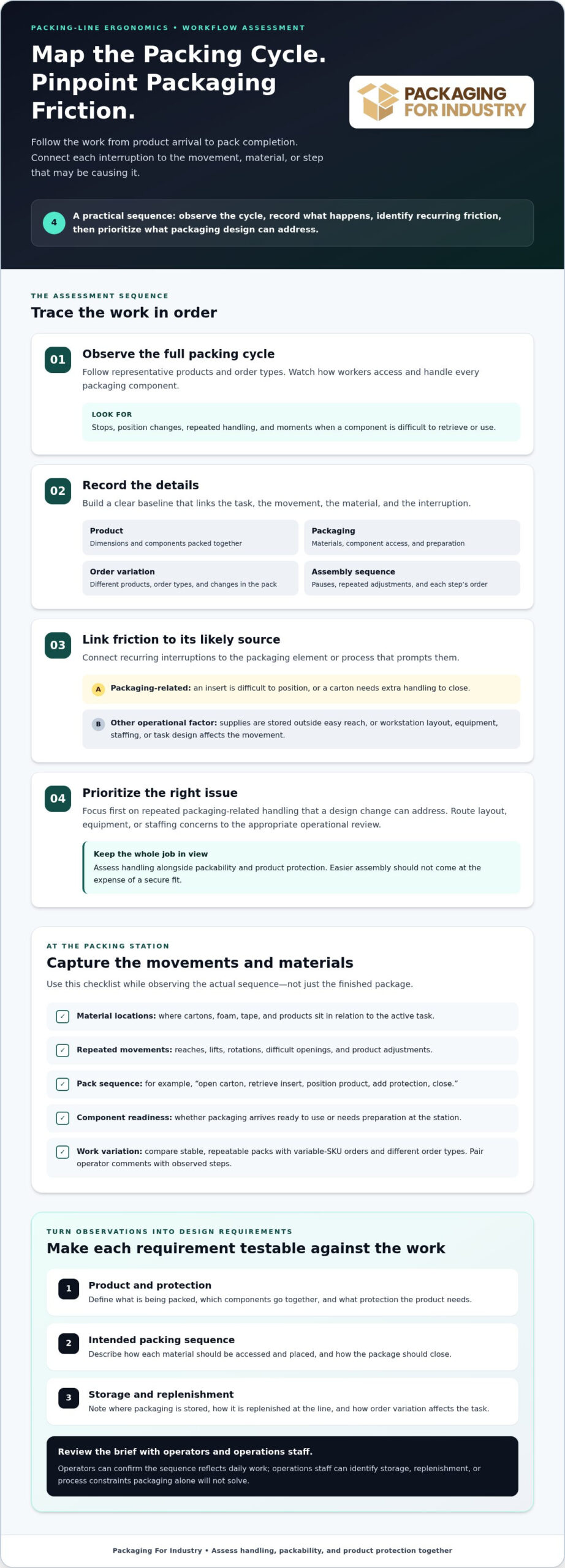
A useful assessment follows the work from the moment a product reaches the station to the point its package is ready to move onward. The goal is to find where packaging creates extra effort, not to assume every delay comes from the box or protective materials. A clear baseline connects the task, the worker’s movement, the material being handled, and the interruption observed.
Use a consistent sequence to turn observations into practical design priorities:
- Observe: Follow the full packing cycle across representative products and order types. Watch how workers access and handle each packaging component.
- Record: Note product dimensions, pack components, order variation, and assembly sequence. Capture what happens at each step, including pauses and repeated adjustments.
- Identify friction: Link each recurring interruption to its likely source. For example, distinguish an insert that’s difficult to position from supplies stored outside easy reach.
- Prioritize: Focus first on repeat packaging-related handling that design can address. Send workstation layout, equipment, or staffing concerns to the appropriate operational review.
What to observe at the packing station
Map the location of cartons, foam, tape, and products relative to the active task. Note repeated reaches, lifts, rotations, difficult openings, and adjustments, then record which material or sequence prompts each movement. Compare low-volume work with high-volume runs and variable-SKU orders. A stable, repeatable pack may expose different friction points than a station handling frequent product changes.
Capture the packaging sequence in plain language, such as “open carton, retrieve insert, position product, add protection, close.” Record whether components arrive ready to use or need preparation at the station. Include operator comments, but pair them with observed steps so the team can distinguish a recurring design issue from a one-off exception.
How to turn observations into design requirements
Convert each repeated issue into a question the packaging design can answer. If an insert shifts during placement, ask how its layout could guide the product into position. If a carton takes extra handling to close, review its fit and closure sequence. Make requirements specific enough to evaluate against the actual work.
- Define the product and protection needs, including the components packed together.
- Describe the intended packing sequence and how each material should be accessed and placed.
- Note how packaging is stored and replenished at the line, including variation among orders.
Review these requirements with operators and the operations team. Operators can confirm whether the proposed sequence reflects daily work; operations staff can identify storage, replenishment, or process constraints that packaging alone won’t solve. This keeps the design brief focused. To turn documented needs into a packaging project, request a packaging quote with product and workflow details.
Compare packaging design choices for easier line handling
Different packaging formats can protect the same product while creating different workloads at the station. Compare options by how the worker accesses the product, assembles the pack, closes it, and positions protective components. The best fit depends on the full packing sequence, product requirements, and how consistently orders arrive. Custom packaging design for packing line efficiency should simplify handling without compromising protection or adding unnecessary material.
Corrugated structures and inserts on the packing line
A standard carton may suit a straightforward pack: open the box, place the product, add protection, and close it. If components need separate positions, workers may have to measure spacing or adjust items by hand. A custom corrugated structure can use partitions or dividers to define placement areas, while pads can separate layers or provide a surface between components. The design should match the actual loading order, not just the product’s shape.
For example, if several parts go into one carton, a partition may help organize them into distinct sections. If a component must sit above or below another, a pad can create a simple layer in the sequence. These structures have trade-offs: extra pieces may require their own loading step, and a close-fitting layout must still allow practical access. PFI’s custom packaging design services can align corrugated structures with product fit and packing tasks.
Foam packaging and kitting for multi-part products
Foam inserts may suit products with distinct shapes or multiple pieces that need an organized arrangement. A shaped pocket can indicate where each component belongs, helping the operator follow a repeatable placement sequence. Test whether the product can be loaded and removed comfortably, whether the insert is easy to orient, and whether it provides the intended protection without obstructing closure.
Kitting offers another approach when a product and its related packaging components need to be gathered for a packing task. It can bring required items into one prepared set, but the kit’s layout and handling still need to fit the line’s process. Foam packaging and kitting can be used separately or together, depending on the product and workflow.
| Format | Handling consideration | Trade-off to consider | What to test |
|---|---|---|---|
| Standard carton | Simple access for a consistent, single-item pack | May leave workers arranging components manually | Opening, product placement, and closure sequence |
| Corrugated partitions, pads, or dividers | Can organize parts or separate layers during loading | Additional pieces may add assembly steps | Ease of orientation and placement during the full pack |
| Foam insert | Shaped areas can guide placement of multiple components | Insert fit and access must suit the product and task | Loading, removal, protection, and closure together |
| Kitted components | Groups related items for a defined packing sequence | Kit preparation and line replenishment become part of the process | Contents, presentation, and handling at the station |
Compare each option under normal packing conditions. The best fit balances product access, manageable assembly, reliable closure, and the operation’s protection needs.
Improve packing-line ergonomics with a controlled design and test process
A packaging change should be approved through practical evaluation, not assumptions. A structured process lets the team check whether a proposed design supports the packing sequence, protects the product, and works with existing line routines before adopting it more broadly. Treat operator feedback and product protection as equally important parts of the decision.
Build an ergonomic packaging design brief
Start with a brief that describes the product, current packaging, assembly steps, observed handling challenges, and protection requirements. Include how components should be stored, presented, assembled, and replenished at the station. Specify relevant product and order variations so the design accounts for actual work, not only a single idealized pack. Review the requirements with line operators, packaging buyers, and operations staff to capture task-level and supply considerations.
Once the brief is agreed, move through a controlled sequence:
- Develop the design: Translate requirements into a packaging concept, including the intended loading and closure sequence.
- Build a prototype or sample: Prepare a version the team can handle and evaluate with representative products.
- Run an operator trial: Test it at the line under normal working conditions, using relevant pack variations and order types.
- Review and revise: Record friction points, protection concerns, and material use, then adjust the design where needed.
- Approve the tested version: Document the accepted configuration and evaluation criteria before planning a broader change.
Prototype and evaluate before changing the line
A prototype turns design assumptions into something operators can test. Use representative products and packaging variations, and run the sample through the usual work sequence rather than evaluating it only on a bench. Include normal material access and replenishment conditions. This helps reveal whether the package is straightforward to open, orient, load, and close within the actual workflow.
Keep feedback structured. Ask operators to note access, reaches, lifts, rotations, adjustments, closure effort, and interruptions. The team should also check product fit and protection, assembly consistency, and whether the design uses materials appropriately. A sample may simplify placement but introduce a new issue, such as a component that’s difficult to orient or a closure step that disrupts the sequence. Record the observation and revise before the next trial.
Use pilot feedback to decide whether the design is ready for approval, needs another revision, or should be assessed under different order conditions. This staged approach helps limit the risk of a packaging change that performs differently on the line than expected. PFI supports evaluation with prototypes and samples, so teams can assess packaging fit before broader implementation.
Apply custom packaging design to your operation with PFI
Packaging design works best when product fit, protection, assembly, and line workflow are considered together. A carton or insert may protect a product in transit, but it also needs to make sense at the packing station, where workers handle materials in a defined sequence. PFI’s custom packaging design connects those requirements to solutions tailored to the product and task.
What to include in a packaging design request
Clear project details help focus the review. Describe the product, current packaging, how each pack is assembled, and the handling challenges your team has observed. Include order variation and production workflow, along with the protection needs the package must meet. Note where materials are stored, how they reach the line, and whether replenishment creates interruptions.
It’s also useful to identify the design scope. A project may call for a corrugated structure, foam packaging, packaging kitting, or an integrated approach. Explain what each component needs to do in the packing sequence so the design can address practical handling as well as product fit.
How PFI supports custom industrial packaging projects
PFI supports custom packaging design with CAD/CAM capabilities, prototypes, and samples that let teams evaluate packaging fit in practice. A packaging review can connect the current pack to product protection and damage-reduction goals, while cost-reduction analysis helps assess the design from an operational and material-use perspective. The focus is a workable packaging solution, not a change for its own sake.
Corrugated packaging can address carton structure and component organization. Foam may suit products that need shaped support, while kitting and assembly can bring related packaging components together for a defined packing task. The right combination depends on the product, protection requirements, and how the line handles each pack. Testing samples with the actual product and assembly steps helps the team assess the proposed design before adopting it across operations.
For a useful project review, bring product details, current packaging information, packing steps, observed handling issues, order variations, and protection requirements. Include samples or notes from operator trials if you have them. These inputs give the design discussion a practical starting point and connect packaging choices to the work on your line.
If you’re considering a packaging change, request a custom packaging quote to discuss your product and packing requirements with PFI.
Put your next packaging improvement into motion
Choose one product or packing task where packaging repeatedly interrupts the work, then define what a better fit needs to accomplish. This gives your team a focused way to evaluate custom packaging design for packing line efficiency against real operating needs, rather than making a broad change without a clear purpose.
PFI supports projects with custom design and CAD/CAM, prototypes and samples, and packaging reviews that consider damage reduction and cost. Bring product details, current packaging, workflow notes, and protection requirements so the design discussion starts with your operation’s needs.
A well-defined project is a strong starting point for packaging that supports both your products and the people who pack them.
Frequently Asked Questions
Can custom packaging improve packing speed without reducing product protection?
Yes. Packaging can be designed to support the packing sequence while meeting product protection requirements. For example, a component’s position inside the carton can affect both how easily it is packed and how it is protected in transit. Evaluate a prototype with the product and protective materials together. Check placement, closure, and product condition before deciding whether the design is suitable for broader use.
How do you measure whether a packaging change improves ergonomics?
Compare the same packing task before and after the change, using similar products and operating conditions. Alongside operator feedback, record observable outcomes such as repeated adjustments, difficulty closing the pack, or interruptions caused by material access. Note packing consistency and product protection concerns, too. These observations help clarify the package’s contribution without treating it as the sole cause of wider workstation or process issues.
Should packaging design account for different products on the same line?
Yes, especially if product changes affect the materials or assembly sequence. Identify which products can share a carton or protective component and which need a different configuration. A shared design may simplify material selection, while a product-specific insert may better organize a particular item. Test representative combinations, including less common orders, to see where an approach works and where it needs adjustment.
Can packaging prototypes be tested by line operators?
Yes. Operators can evaluate whether a sample works during the actual task. Ask them to handle the prototype as they would a production pack and note issues such as hard-to-reach components, confusing orientation, or closure steps that disrupt the sequence. A short feedback form can make comments easier to compare across trial participants. Combine those observations with product protection and production requirements before revising the design.
What information is needed to redesign packaging for a packing line?
Share enough detail to show how the product moves from the station into its finished pack. Along with dimensions and existing packaging, provide photos or a sample of the current pack, a description of the shipping method, and examples of recurring damage or assembly difficulty. For operations in Orange County, Los Angeles, San Diego, or Riverside, these details help PFI frame the review around the product and its operating context.
Does packaging kitting help reduce handling at a packing station?
It can organize items used together for a specific packing task, but the kit needs to fit the operation. Consider how kits will be identified, staged, and replenished, and how the team will handle orders that need different combinations. For example, separate kits for distinct product configurations may help prevent components from being mixed, provided the staging process stays clear and manageable.
How often should a company reassess packing-line packaging?
Reassess packaging when a change in product, shipping method, order mix, or production process could affect fit or handling. A new product revision, for instance, may alter how it sits in an existing insert even if the outer carton stays the same. Teams can also build packaging reviews into operational change discussions, helping buyers and production staff flag issues before a new configuration becomes routine.